How to Redeem Raid Shadow Legends Promo Codes — Step-by-Step Guide (2026)
Learning to redeem Raid Shadow Legends promo codes takes less than 60 seconds once you know where the menu is. This guide covers the exact steps for iOS, Android, and PC via Plarium Play, plus every common error and how to fix it. Ready to claim? First, grab the latest working Raid Shadow Legends codes →
Works on Every Platform
Plarium promo codes work identically across every platform Raid: Shadow Legends supports. Whether you're on mobile or desktop, the redemption process is the same menu — just follow the steps below for your device.
iOS
iPhone & iPad — same menu as Android
Android
Phones & tablets — full promo code support
PC
Via Plarium Play desktop client
How to Redeem Plarium Promo Codes on Mobile (iOS & Android)
This is the fastest method to redeem raid promo codes — the entire process takes under 30 seconds on mobile.
Open Raid: Shadow Legends
Launch the game on your iOS or Android device. Wait for the game to fully load to the Bastion screen (your main hub). Do not tap anything else yet.
Tap the ☰ Menu Icon (Top-Left Corner)
Look for the three horizontal lines (☰) in the very top-left corner of your screen. Tap it to open the main game menu. This is sometimes called the "hamburger menu."
Select "Promo Codes" from the Menu
Scroll down through the menu options until you see "Promo Codes." Tap it. A dialog box will pop up with a text input field ready for your code.
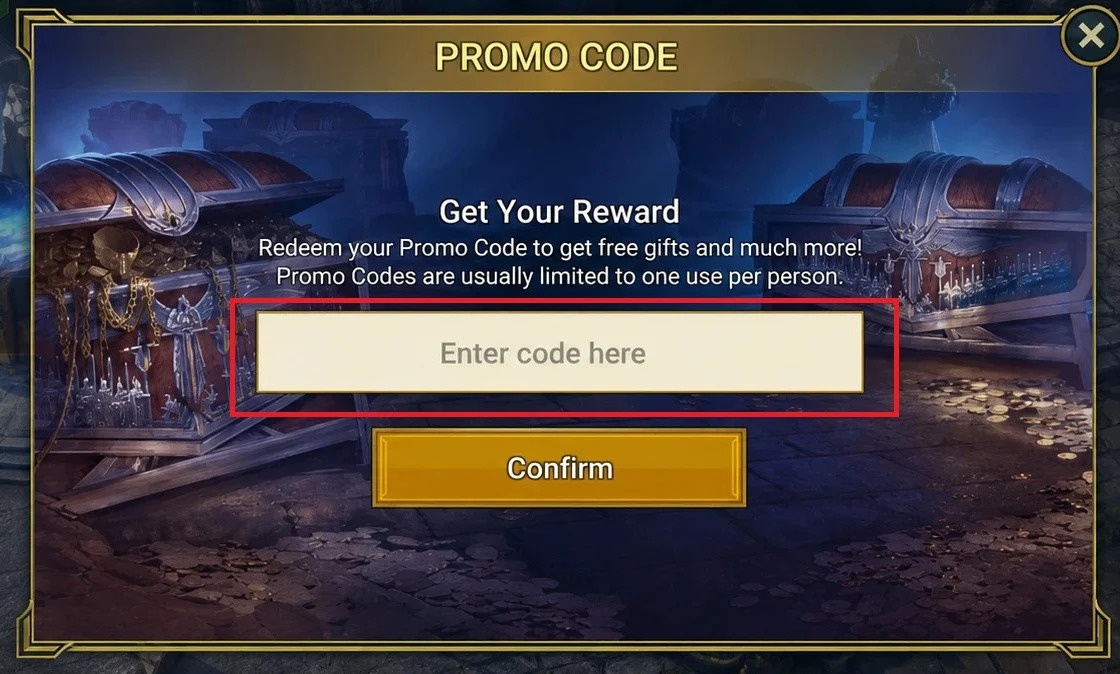
Enter Your Raid Shadow Legends Code
Tap the text field ("Enter code here") and type or paste your promo code exactly as shown above. Codes are case-sensitive — copy them directly from our homepage codes list to avoid typos.
Tap "Submit" — Collect Your Rewards
Tap the "Submit" button. A success confirmation will appear. Open your in-game Inbox (envelope icon) to collect your free rewards immediately.
Pro tip: Long-press on a code on our homepage to copy it instantly, then switch to Raid and paste it directly. This avoids any manual typing errors that cause "Code Not Found" errors.
How to Redeem Raid Promo Codes on PC (Plarium Play)
Redeeming Plarium promo codes on PC uses the Plarium Play desktop client. The menu is in exactly the same location as mobile, making the process identical.
Launch Plarium Play Desktop App
Open the Plarium Play launcher on your Windows PC. If you don't have it installed, download it free from plarium.com. Sign into your Plarium account.
Start Raid: Shadow Legends
From the Plarium Play library, click "Play" on Raid: Shadow Legends and wait for the game to fully load to the Bastion screen.
Click the Menu Icon (☰) in the Top-Left
The three-line menu (☰) is in the exact same position as mobile — top-left corner of the game window. Click it to open the main menu.
Click "Promo Codes" and Enter Your Code
Scroll down in the menu to find "Promo Codes." Click it, then paste your copied code into the text box. Use Ctrl+V to paste on PC.
Click "Submit" to Claim Your Free Rewards
Click "Submit" and you'll see a confirmation message. Your rewards are instantly delivered — click the Inbox icon to collect them.
Common Errors Redeeming Plarium Promo Codes (And How to Fix Them)
Hitting an error when you try to redeem raid promo codes? Here are the most common issues and their exact fixes.
| Error Message | What It Means | Fix |
|---|---|---|
| "Code Not Found" | The code doesn't exist or was typed incorrectly | ✓ Copy the code directly from our list — don't type it manually. Ensure no spaces before/after. |
| "Code Already Used" | You've already redeemed this exact code on your account | ✓ Each code can only be used once per account. Try a different active code from our list. |
| "Code Has Expired" | Plarium deactivated the code — most expire in 24–72 hours | ✓ Return to our homepage for fresh verified codes. Bookmark us and check daily. |
| "Invalid Code" | Wrong capitalisation or special character | ✓ Raid codes are case-sensitive. Use copy-paste, never manual entry. |
| Submit button greyed out | The text field is empty or the game lost focus | ✓ Tap inside the text field first to focus it, then paste your code. |
Act fast — codes expire quickly! Most Plarium promo codes are valid for just 24–72 hours. Bookmark raidshadowcodes.online and check daily to never miss a new code drop.
Tips to Maximize Your Raid Promo Codes
Save Shards for 2× Summoning Events
If your Raid Shadow Legends code redeem rewards you with Sacred or Ancient Shards, don't use them immediately. Wait for Plarium's double-chance summoning events — you'll get twice the Legendary pull probability for the same shard investment.
Stack Energy Codes During CvC Tournaments
Energy from Plarium promo codes is most valuable during Clan vs. Clan (CvC) or Dungeon Divers tournaments. Use energy refills during these events to score maximum tournament points for your clan.
How to Redeem Raid Promo Codes Before They Expire
Set a daily reminder to visit this site. We update our active Raid Shadow Legends promo codes list the moment Plarium releases new codes via official channels. You can also follow Raid's official social channels for first-alert code drops.
Use Multiple Accounts to Test Codes
If you're unsure whether a code is still active, try it on an alternate account first before your main. An expired code will give the "Code Has Expired" error instantly, while a working code will deliver rewards.
Frequently Asked Questions About Redeeming Raid Codes
Can I redeem Raid promo codes on multiple accounts?
Yes — Plarium promo codes can be redeemed on multiple different Plarium accounts. Each unique account gets one redemption per code. You cannot redeem the same code twice on the same account.
How long do Plarium promo codes last?
Most Raid Shadow Legends codes last 24–72 hours. Content creator partnership codes can sometimes last up to a week. Event-specific codes tied to Plarium's seasonal promotions may also have extended validity windows.
Where is the promo code menu in Raid: Shadow Legends?
Open the game to the Bastion screen, tap the ☰ icon in the top-left corner, then scroll down to find "Promo Codes." This location is identical on iOS, Android, and PC via Plarium Play.
Do codes work on Plarium Play (PC) the same as mobile?
Yes — all Plarium promo codes work on PC via Plarium Play exactly the same way as on mobile. Rewards are tied to your Plarium account, not your device, so you'll see them on all platforms after redeeming on any one device.
For more detailed answers, visit our full Raid Shadow Legends Promo Code FAQ page →